What is a 3-in-1 cable?
A 3-in-1 cable is a USB cable with three different connectors on the device side. Each time, you choose the connector that matches the device you want to charge. This means the cable replaces several separate charging cables. Ideal, because you no longer have to keep switching adapters.
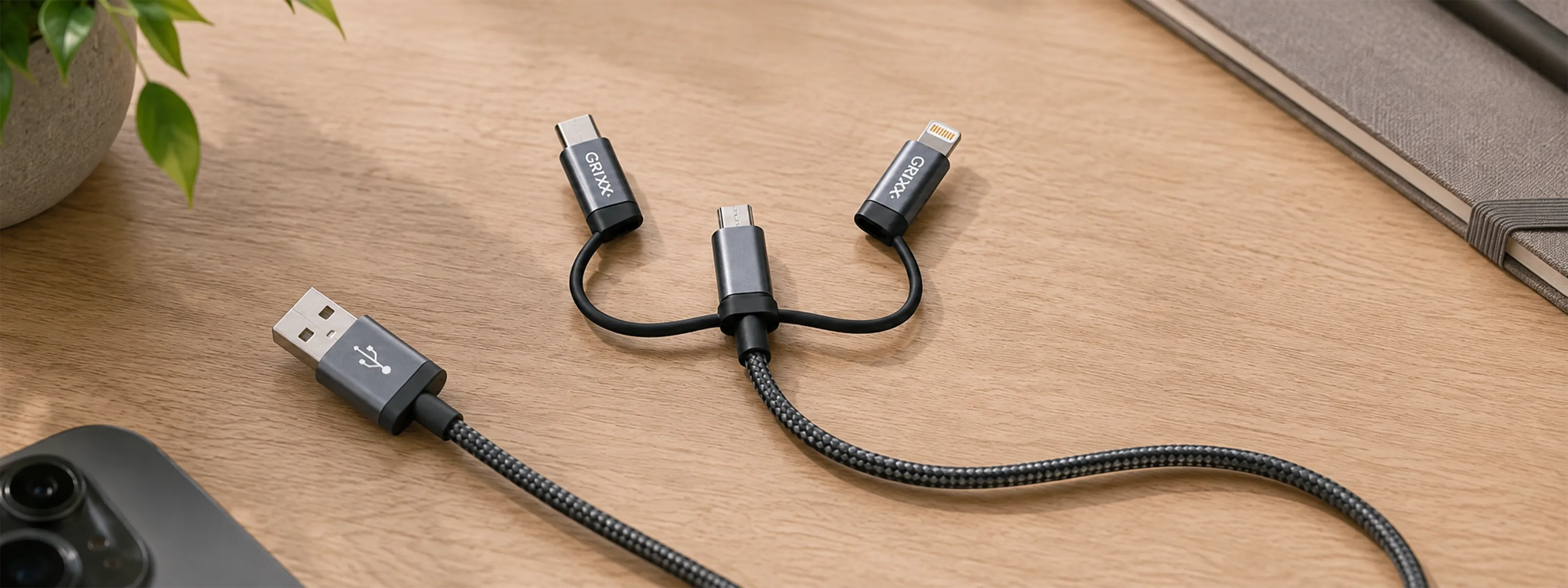
The Grixx 3-in-1 cable combines USB-C, micro-USB, and Lightning. The power side uses USB 2.0. The cable is one metre long and has a braided nylon sleeve with aluminium connectors. The Lightning connector is MFi-certified. This may sound technical, but in short, it means the cable is high quality.

What connectors does a 3-in-1 charging cable have?
USB-C
USB-C is a compact, reversible connector found on many recent phones, tablets, earbuds, power banks, and other accessories. This means you can charge your phone – whose battery sometimes runs out faster than you would like – wherever and whenever you want.
Micro-USB
Micro-USB is mainly found on older phones and accessories such as lights, speakers, remote controls, and certain power banks. This connector can still be very useful, especially when you use both newer and older devices.
Lightning
Lightning is used by various generations of mobile devices and accessories. With suitable certification, the connector is designed to work reliably with these devices.
When is a 3-in-1 USB cable useful?
The biggest advantage is not that you use three cables at the same time, but that one cable prepares you for multiple situations. A charging cable is practical, for example, in the following situations:
- On the go: keep one cable in your work, school, or laptop bag.
- On holiday: charge different devices without taking a bundle of separate cables with you.
- In the car: keep one spare cable available for multiple passengers and devices.
- At home: use one fixed cable in a central location, such as the kitchen or living room.
- At the office: offer visitors or colleagues a charging option without laying out three separate cables.
What are the benefits of a 3-in-1 charging cable?
Fewer separate cables
One cable takes up less space than three separate cables. This keeps your bag, desk, or cable box organised and reduces the chance of taking the wrong cable with you.
Suitable as a spare cable
A 3-in-1 charging cable is a logical backup for when you are on the go. Even if you use only one connector every day, you are prepared when someone else needs a different type of connector. You never know when you might suddenly need to rescue your mum's old phone.
Practical for different generations of devices
New devices are increasingly using USB-C, while older accessories may still have micro-USB or Lightning. With a 3-in-1 USB cable, you do not have to replace useful older devices immediately just because the connector is different.
Can you charge multiple devices at the same time?
A 3-in-1 cable is primarily intended for choosing one suitable connector for the device you are charging at that moment. It is not a USB hub or charging station.
With the Grixx cable, the USB-C and Lightning attachments work via the micro-USB base connector. Therefore, attach the desired connector correctly to the micro-USB connector before connecting the cable.
Does a 3-in-1 cable support fast charging?
Not every 3-in-1 cable supports fast charging. The Grixx 3-in-1 cable is designed for standard charging and does not support Power Delivery or Quick Charge. Do you need maximum charging speed? Then choose a separate cable that is specifically suitable for your device's fast-charging protocol and power requirements.
For daily top-ups and as a versatile spare cable, a 3-in-1 model offers a great deal of convenience. The best choice therefore depends on your priority: maximum speed or as many connectors as possible in one cable.
What should you look for when buying a 3-in-1 cable?

1. The three connectors
First, check which ports your devices have. A combination of USB-C, micro-USB, and Lightning covers many mobile devices and accessories.
2. The material
A cable is often rolled up, carried around, and bent near the connector. A braided nylon sleeve and sturdy connector housing help protect the cable against daily use. This allows the cable to last longer, even when it lies at the bottom of your bag.
3. The cable length
A one-metre cable is compact enough to take with you and long enough for use at a desk, bedside table, or power socket.
4. Charging speed and data transfer
Do not look only at the shape of the connector. Also check whether the cable supports the required charging power and any data transfer. A suitable connector does not automatically mean that every fast-charging protocol is available.
5. Certification and warranty
Clear specifications, relevant certification, and a warranty provide greater certainty about compatibility and quality. The Grixx 3-in-1 cable has an MFi-certified Lightning connector and a two-year warranty. So if something unexpectedly goes wrong, you can count on a suitable solution.
Who is a 3-in-1 USB cable suitable for?
A 3-in-1 charging cable is particularly suitable for users who value convenience and flexibility. Think of households with different devices, travellers, commuters, colleagues who share a charging point, or people who want to take one complete emergency cable with them.
Do you always use one modern device and mainly want to charge as quickly as possible? Then a dedicated USB-C cable may be a better choice. If you use multiple connectors and want to carry fewer separate cables, a 3-in-1 cable offers the greatest practical value.